 elepay
Webhook
概要
お客様のシステムと連携するために、elepay は開発者に非同期通知を処理する Webhook および関連ツールを提供しています。
Webhook
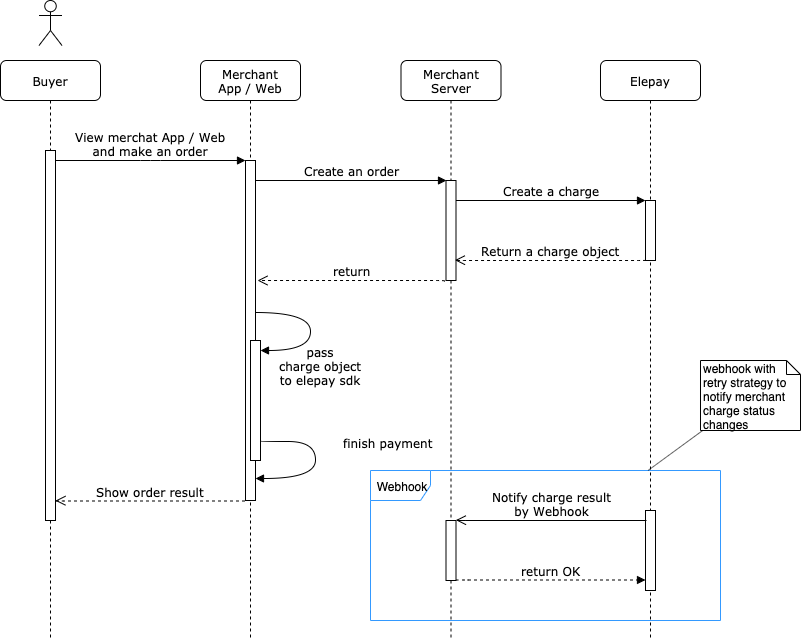
Webhook とは、あるサービスで発生したイベントの通知を、HTTP 経由の外部 URL で受け取る仕組みのことです。
ツール
Webhook 通知の送信とリクエストのログ、レスポンスのフォーマット検証などの開発ツールを提供しています。詳しくは開発ツールをご覧ください。
利用ガイド
利用シーン
Webhook を使うと、例えば下記のような elepay で起きたイベントを、任意の URL に対して通知することができます。
- 支払いが正常に行われたとき
- 返金が正常に行われたとき
elepay の管理画面から送信先 URL を追加するだけで、上記のようなイベントが自動的に通知されるようになります。
利用の設定
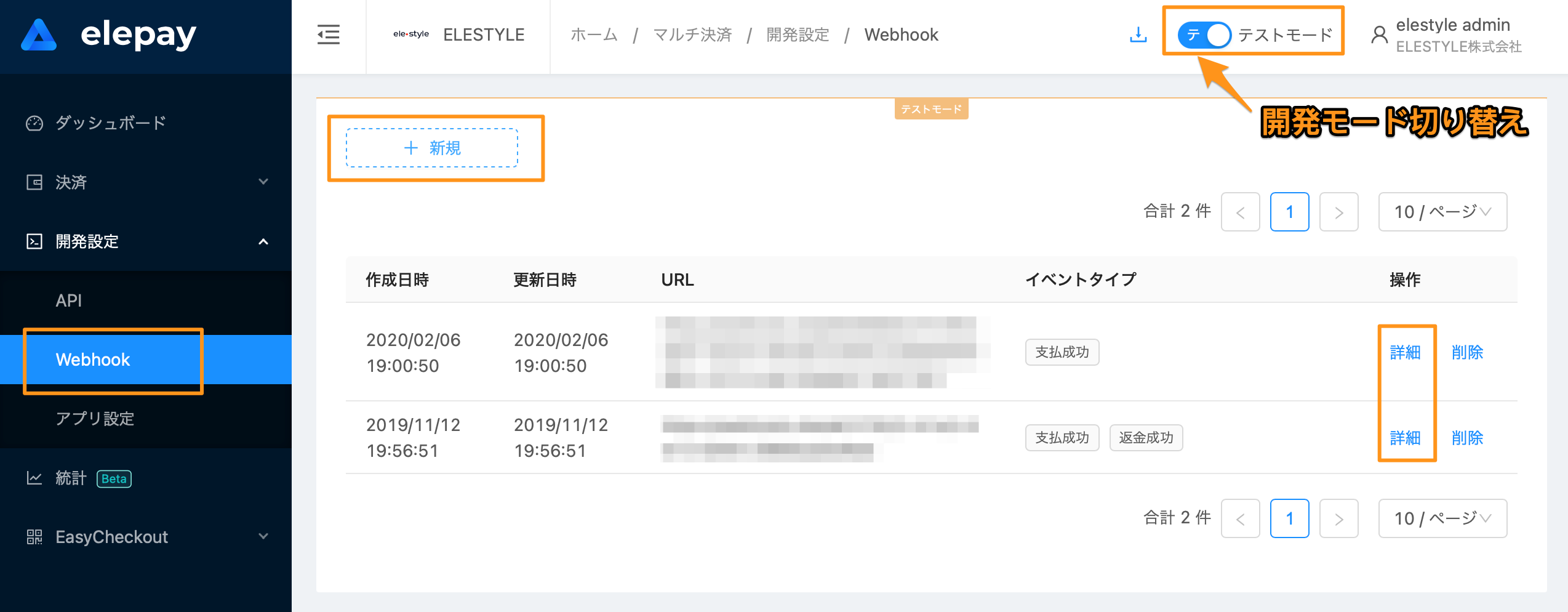
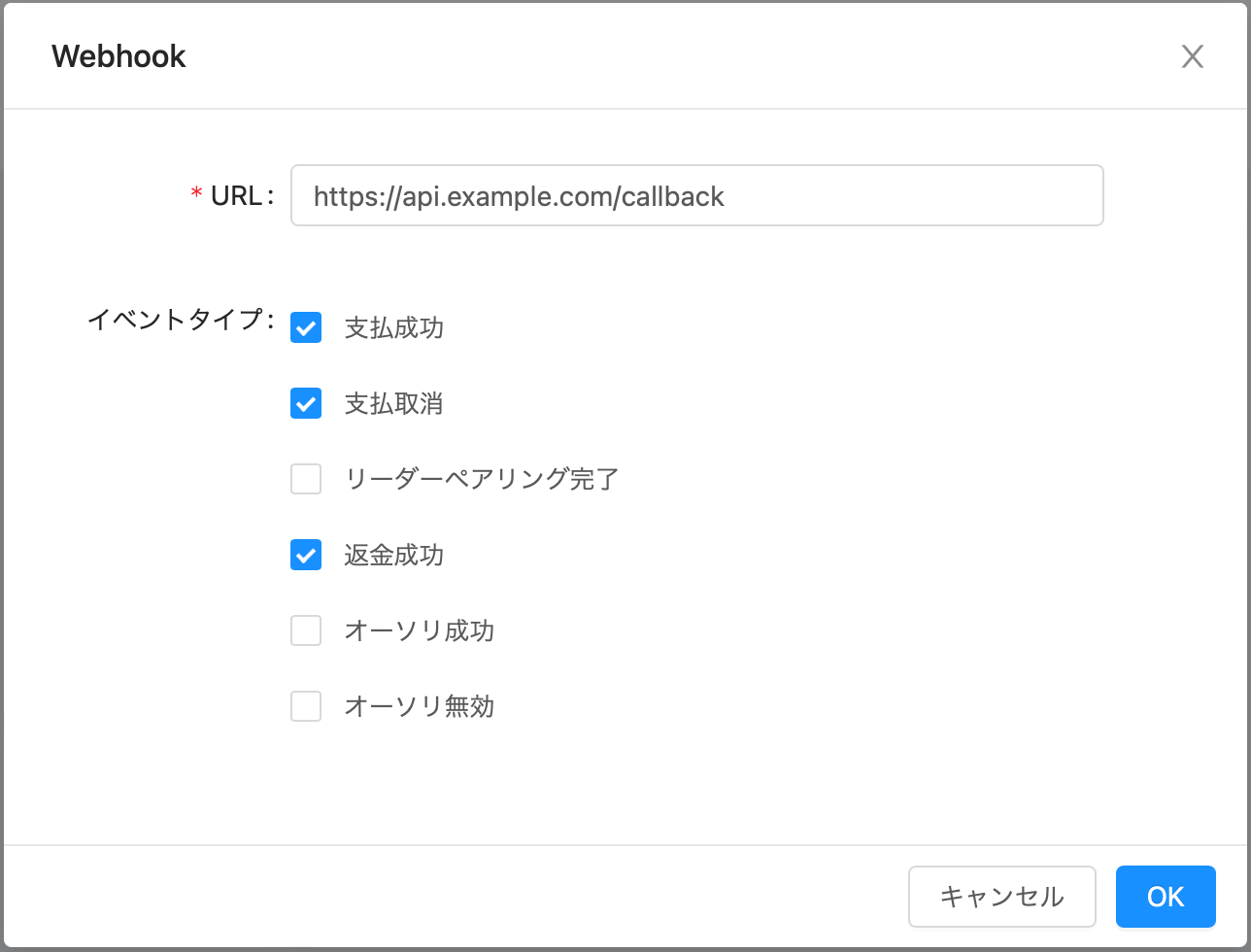
elepay の管理画面にログインして、下記の管理画面から Webhook の送信先を追加できます。URL を入力し、イベントタイプを選択し、最後に追加を押せば完了です。Webhook 送信先は複数追加することが可能です。
1. Webhook URL
「開発設定/Webhook」にて Webhook 通知を受ける URL を指定できます。
2. Test モードと Live モード
Test モードと Live モード両方サポートしています。管理画面の上にある Test / Live モード切り替えボタンによって、両方の設定を管理できます。
3. Webhook イベント
elepay は Webhook の通知イベントを定義しています。後述のようなイベントが起きた時に該当する Webhook の通知が送信されます。
リクエスト
elepay の Webhook はすべて POST リクエストで送信され、リクエストボディには、イベントの JSON データが含まれています。
イベントの一覧
下記は実際に elepay から送信されるイベントの種類です。それぞれの内容に応じて、イベントの JSON データが送信されます。 type はイベントの JSON データに含まれます。
| タイプ | 内容 |
|---|---|
charge.succeeded | 支払い成功 |
charge.revoked | 支払い取消し |
refund.succeeded | 返金成功 |
source.activated | オーソリ成功 |
source.inactivated | オーソリ無効 |
reader.activated | リーダーペアリング完了 |
下記は、1800円の支払いが成功したときに Webhook で送信されるイベントのデータ例です。
{
  "id": "evt_la06CoQAiPojSgJKe5gt3nwq",
  "object": "event",
  "createTime": 1543944030817,
  "liveMode": false,
  "type": "charge.succeeded",
  "data": {
    "object": {
      // Charge Object
    }
  }
}
data にはイベントの詳細内容が入ります。API で返ってくるレスポンスと同様の JSON データです。
通知の受け取り
正常処理
Webhook 通知を正しく受け取った場合、2xx の HTTP ステータスコードを返してください。
異常処理
Webhook 通知の受け取りに異常がある場合、必ず 4xx や 5xx の HTTP ステータスコードを返してください。その場合、elepay は自動的にリトライを行います。リトライは、最初は1分間隔で3回行います、その後は10分間1回で、最大2回のリトライが行われます。
それでも正常に受け取れなかった場合は、別途同期APIをご利用いただき、同期処理で決済結果を同期してください。
| リトライ | 回数 | 間隔 |
|---|---|---|
| 1 ~ 3 回目 | 合計 3 回 | 1 回 / 1 分間 |
| 4 ~ 5 回目 | 合計 2 回 | 1 回 / 1 0 分間 |
正当性
elepay のサーバーからのすべての Webhook には elepay-signature がヘッダーに含まれています。 具体的には下記のような内容となっています。
形式:
elepay-signature: t=[タイムスタンプ],sign=[署名値]

例:
elepay-signature: t=1581064080,sign=100dcc3d839c89cd91ecdd23d7305b2fdb8ae73b498c27efd812b25fc86ec702
📘 ご利用のFrameworkによります、HTTPのヘッダーが全部小文字の
elepay-signatureに処理してくれない場合があります。 該当場合はElepay-Signatureでお試しください。
正当性チェックロジック
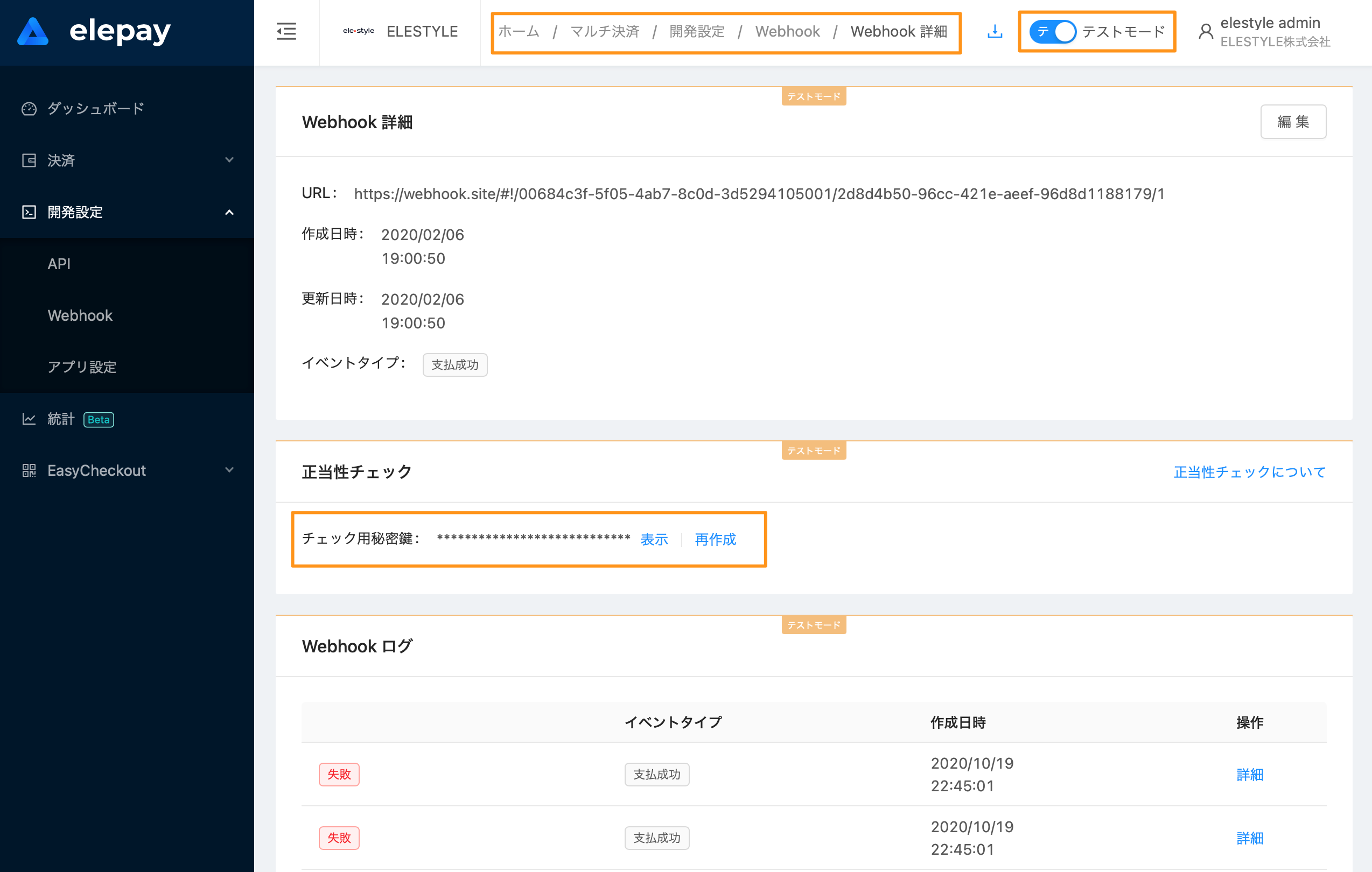
この値にタイムスタンプと署名 チェック用秘密鍵を使って、HMAC-SHA256 署名アルゴリズムで暗号化されています。 チェック用秘密鍵は管理画面の Webhook 詳細画面で確認できます。再作成もできます。
- ヘッダーからタイムスタンプと署名値を取り出します。
- リクエストからボディデータを取り出します。
- 「1で取得したタイムスタンプ + "." + 2で取得した内容」を作成します。
- チェック用秘密鍵を使って、3で作成した文字列をHMAC-SHA256アルゴリズムで署名します。
- 4で作成した文字列と1で取得した署名値を比べて、正当性をチェックします。
最終更新日